
BigQuery AI Agents: Why Direct Warehouse Access Fails in Production
Giving AI agents direct access to BigQuery can look impressive in a demo, but in production it often leads to inconsistent metrics, governance risks, and expensive queries.
For a lot of teams, the first version of an AI analytics assistant seems obvious.
You connect a large language model to BigQuery, give it access to the warehouse, let users ask questions in natural language, and let the model generate SQL on the fly. In a matter of hours, you have something that looks like the future of analytics: a stakeholder types a question, the agent writes a query, and an answer appears in seconds.
In a demo, it feels magical.
In production, it often falls apart.
The finance team gets a different revenue number from the one in the board deck. Analysts realize the agent is reading raw tables instead of governed models. Security starts asking what data the model can actually see. Infrastructure notices inefficient queries scanning huge datasets. Suddenly, what looked like an intelligent analytics system starts behaving like an unpredictable layer on top of your warehouse.
The problem is not that the model cannot write SQL.
The problem is architectural.
Many teams confuse access to BigQuery with understanding of the business. And those are not the same thing. An AI agent that can query your warehouse is not automatically an agent that can interpret business intent, apply the right metric definitions, respect governance boundaries, control execution cost, and provide analysis in context.
That gap is where most BigQuery agent analytics projects break.
This article explains why direct warehouse access is so tempting, why it fails in production, the five failure modes behind that failure, and what a production-grade architecture should look like instead.
Why Connecting an AI Agent to BigQuery Feels Like the Obvious Move
The appeal is easy to understand.
BigQuery already sits at the center of the modern data stack for many companies. It stores product data, marketing data, finance data, customer events, CRM exports, ecommerce transactions, and operational logs. It is often treated as the single source of truth. So when teams start exploring AI agents for analytics, the most natural assumption is simple: if the data is already in BigQuery, why not let the AI query it directly?
The rise of text-to-SQL tools makes that assumption even stronger.
The workflow looks elegant on the surface. A user asks, “What was revenue from paid search last month?” The model translates the question into SQL, runs it against BigQuery, and returns an answer. That interaction is intuitive, immediate, and easy to demo. It makes analytics feel accessible to non-technical users without forcing them into dashboards or BI tools.
The hidden assumption is that once the model can generate SQL, the analytics problem is basically solved.
But generating syntactically correct SQL is the easy part.
The hard part is understanding what the question actually means, deciding which metric definition is valid, knowing what data should or should not be accessed, making sure the query is safe and efficient, and interpreting the result inside the business context that gives it meaning.
That is why the shortest path from prompt to warehouse works nicely in a demo but becomes dangerous in production.
Why Access to BigQuery Does Not Mean Business Understanding
A warehouse stores data. It does not store meaning in a way that a model can reliably use on its own.
That distinction matters more than most teams realize.
When someone asks a business question, they usually speak in shorthand. They say things like:
- “How did we do last month?”
- “What’s our churn trend?”
- “Which channel is performing best?”
- “What is revenue in EMEA?”
- “Who are our best customers?”
These questions sound simple to humans because humans bring context with them. They know which version of revenue the finance team uses. They know whether churn means logo churn or revenue churn. They know that “best customers” might mean highest lifetime value, lowest support cost, or strongest repeat purchase behavior depending on the meeting and the team.
BigQuery cannot supply that meaning by itself. And an AI agent with direct warehouse access cannot reliably infer it every time.
Without additional layers, the agent has to guess:
- the user’s intent,
- the definition of the metric,
- the right tables and joins,
- the governance boundaries,
- and the broader context around the answer.
That is why the core thesis here is simple:
Access is not understanding.
An AI agent can have perfect access to your warehouse and still give the wrong answer for the business.
Once you see that clearly, the failure modes become obvious.
Failure Mode #1: Ambiguous Business Questions Become Bad Queries
The first major failure is the lack of an intent layer.
Business language is fuzzy. SQL is rigid. The moment you connect an AI agent directly to BigQuery, you force the model to compress ambiguity into a precise query whether or not the original question was precise enough to support that.
Take a simple example: “What was revenue last month?”
That question looks harmless, but it immediately raises a series of unresolved decisions. Does revenue mean gross revenue or net revenue? Should refunds be excluded? What about taxes, discounts, canceled orders, partial returns, or one-time adjustments? Which timezone defines “last month”? Is the company reporting on order date, payment date, or recognized revenue date?
A human analyst usually resolves these questions through experience, documentation, or clarification. A direct-access AI agent often resolves them by guessing.
And the danger is not only that it may guess wrong. The danger is that it returns the answer with confidence, which makes the output look authoritative even when the interpretation underneath is unstable.
This is where many teams misdiagnose the problem. They assume the issue is that the model wrote bad SQL. In reality, the SQL may be perfectly valid. The real failure happened earlier, when the system translated a fuzzy business question into a precise query without enough grounding.
What is missing is an intent layer.
A production-grade AI analytics system needs a layer that sits between natural language and query generation. That layer should help the system determine whether the user is asking for a validated business metric, an exploratory question, a comparison, a root-cause analysis, or something that requires clarification before execution. It should be tied to a business glossary, controlled terminology, approved query patterns, and explicit routing logic.
In other words, the system should not jump straight from prompt to SQL. It should first ask: What does the user actually mean?
Without that step, bad questions become bad queries, and bad queries become untrustworthy answers.
Failure Mode #2: Without a Semantic Layer, Metrics Drift Fast
The second failure mode is the absence of a semantic or metric layer.
This is where trust usually breaks first in real organizations.
Most warehouses contain multiple representations of the same business reality. Raw source tables coexist with transformed tables. Legacy models coexist with newer models. Different teams use slightly different logic for the same KPI. Analysts often know which table is “safe” and which one is just a staging artifact. An AI agent with direct BigQuery access usually does not.
That means the same question can produce different answers depending on which tables the model chooses, how it joins them, and what assumptions it makes about the metric.
Ask the agent for gross margin, active users, retention, or customer lifetime value, and you may get a technically valid answer that still differs from the number the business trusts. Not because the model is broken, but because the warehouse contains multiple paths to a number and not all of them reflect the official definition.
Once that happens more than once, confidence collapses quickly.
A stakeholder does not care that the answer was generated in three seconds if it does not match the board deck, the finance report, or the dashboard used in executive reviews. Speed is irrelevant when the metric itself is unstable.
This is why AI agents for analytics need a semantic layer.
Instead of letting the model derive metrics directly from raw or semi-raw tables, the system should force the agent to operate through governed metric definitions. That could mean a dbt semantic layer, Looker models, Cube, a metrics API, or another abstraction that centralizes business logic and keeps definitions versioned and auditable.
The point is not the tool. The point is the architecture.
A production agent should ask for metrics, dimensions, filters, and approved entities. It should not invent business definitions on the fly from warehouse structure alone.
If your agent can answer the same KPI differently from one session to the next, you do not have intelligent analytics. You have metric drift with a chatbot interface.
Failure Mode #3: Direct BigQuery Access Creates Security and Compliance Risks
The third failure mode is governance.
When teams say an AI agent has “direct access” to BigQuery, that usually means the system has credentials, service account permissions, or warehouse-level access that is broader than it should be. In early prototypes, this often gets waved away as a convenience. In production, it becomes a serious risk.
The first issue is scope.
If the agent can read across datasets, tables, or views without carefully constrained permissions, then every prompt becomes part of your attack surface. A user does not have to be malicious for this to become dangerous. They may ask a badly phrased question that exposes sensitive columns. They may unintentionally request personally identifiable information. Or they may push the system into areas it was never supposed to touch because the boundaries are not enforced in the architecture.
The second issue is prompt injection and prompt abuse.
A direct-access setup can create scenarios where users manipulate the model into attempting queries that bypass intended behavior. Even if your prompt says “only answer marketing questions,” that instruction is not a governance model. Security that lives only in prompt text is not security.
The third issue is compliance.
If the system can retrieve regulated data or expose it in model context, you now have to think about auditability, access logging, least privilege, data minimization, and whether the downstream LLM system is appropriate for that kind of data flow. This is especially relevant in environments with GDPR, SOC 2, internal access controls, or industry-specific requirements.
What is missing here is a governed access layer.
A production architecture should enforce least privilege through scoped views, row-level security, column-level restrictions, approved access domains, and intermediary services where needed. The agent should see only the subset of data that is necessary for its role and use case. Ideally, it should interact with curated interfaces, not broad warehouse exposure.
The key principle is straightforward:
Your AI agent should not have broader access than your governance model.
If your system relies on the model behaving nicely instead of enforcing boundaries structurally, it is not production ready.
Failure Mode #4: Uncontrolled SQL Causes Cost and Latency Problems
The fourth failure mode is execution.
This is where BigQuery’s power becomes a liability if the architecture is too loose.
Large language models do not have an innate understanding of cost efficiency, partition strategy, clustering design, or the tradeoffs behind query planning. They can produce valid SQL that is dramatically more expensive than a human analyst would ever allow into production. That matters because BigQuery makes it relatively easy to scan huge volumes of data, and relatively easy to spend a lot of money doing it.
A model may generate:
- full table scans instead of partition-filtered queries,
- unnecessary joins across very large tables,
- unbounded explorations of event-level datasets,
- inefficient subqueries,
- or repeated retries that compound cost and latency.
From the user side, this often shows up as “the agent is slow” or “the numbers took forever to load.” From the engineering side, it shows up as runaway bytes processed, heavy slot usage, expensive failures, and growing mistrust in the product experience.
And this is not only about infrastructure cost. It is also about product trust.
If an analytics agent takes too long to respond, users stop relying on it. If its behavior is unpredictable, they stop asking important questions. If it occasionally triggers absurdly expensive queries, the system becomes politically difficult to support internally no matter how promising the concept is.
What is missing is an execution control layer.
Production systems need query validation before execution. They need dry runs to estimate bytes processed. They need cost thresholds, query templates, partition enforcement, table allowlists, and logic that can reject or rewrite risky SQL before it reaches BigQuery. In some cases, they also need pre-aggregated datasets or controlled APIs rather than direct query generation against large warehouse tables.
The principle here is simple:
If the agent can run the query, it should also respect the constraints.
Without execution guardrails, every natural language interaction becomes a potential cost and latency problem.
Failure Mode #5: Without Context, the Analysis Stays Superficial
The fifth failure mode is more subtle, but just as important.
Even if the model gets the SQL right, uses the correct metric, respects security boundaries, and keeps costs under control, the output can still remain shallow. That is because querying data is not the same as analyzing a business.
Most direct-access systems treat each question as a standalone interaction. The user asks something, the model writes SQL, the result comes back, and the system summarizes it. Then the context disappears.
That architecture is good at retrieval. It is weak at sustained reasoning.
Real analytics work is iterative. Questions build on previous questions. Definitions depend on the role of the user. A spike in revenue means something different if CAC doubled at the same time. A decline in repeat purchases means something different if a major product line was removed. Good analysis depends on memory, comparison, historical anchoring, domain knowledge, and the ability to connect separate signals into one explanation.
A warehouse alone does not provide that. And an LLM with stateless direct access usually does not either.
The result is a system that produces outputs that look smart but often lack depth. It can summarize a number. It can describe a trend. But it struggles to reason through the business significance of what it found unless that context exists somewhere outside the raw query path.
What is missing is a context and reasoning layer.
This layer can take different forms depending on the product. It might include memory of previous queries, entity-level business logic, access to curated metadata, explanatory frameworks, anomaly detection logic, or historical benchmarks. The important point is that the agent should not operate like a one-shot SQL machine if the goal is actual analysis.
The real promise of AI analytics is not that a model can answer a question about data. It is that the system can help users make better decisions.
That requires context, not just access.
When Direct BigQuery Access Is Actually Fine
None of this means direct access is always wrong.
It can be perfectly reasonable in the right setting.
For example, direct BigQuery access is often acceptable in:
- internal prototypes,
- hackathons,
- sandboxes with masked data,
- narrow read-only tools for analysts,
- controlled exploratory workflows,
- or early-stage experiments where the goal is learning, not production trust.
In those environments, the point is often to validate demand, test UX, learn where value exists, and understand what layers will eventually be needed. Used that way, direct access can be a fast and useful shortcut.
The problem starts when teams mistake a demo architecture for a production architecture.
Those are not the same thing.
A prototype is allowed to be fragile. A production analytics system is not.
Demo Architecture vs Production Architecture
The most useful reframing is this:
The real product is not the chat interface.
The real product is the architecture behind it.
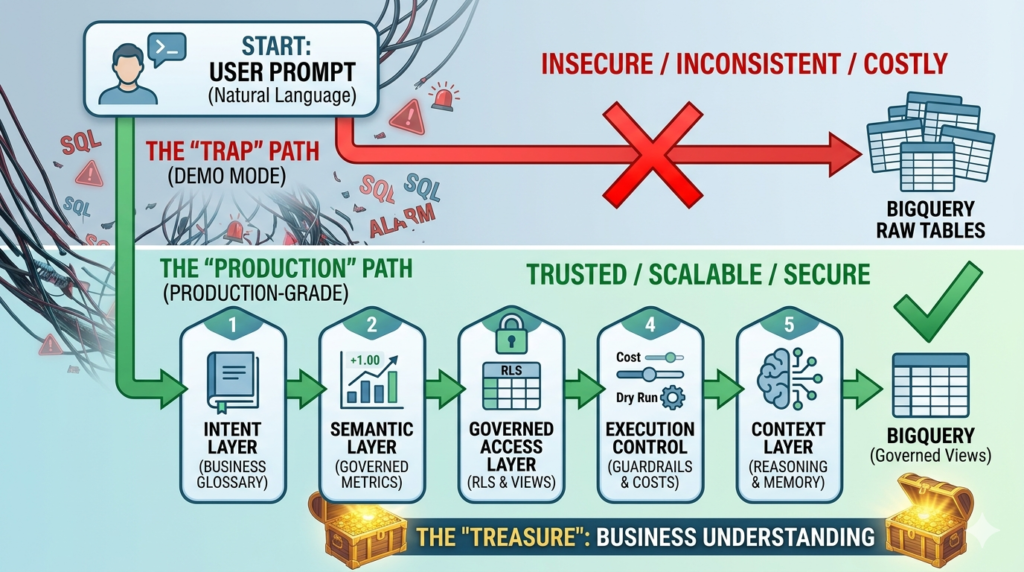
A demo architecture often looks like this:
Agent → BigQuery
That is why it is easy to build and easy to show.
A production architecture looks more like this:
Agent → Intent Layer → Semantic Layer → Governed Access Layer → Execution Control Layer → Context Layer → BigQuery
Each layer exists to remove a specific failure mode.
1. Intent Layer
This layer interprets the user’s question before the system generates SQL or requests a metric. It maps fuzzy business language to known concepts, routes questions to the right workflows, handles clarification when needed, and prevents the model from inventing meaning too early.
2. Semantic Layer
This layer governs metrics, dimensions, entities, and calculation logic. It ensures that “revenue,” “churn,” or “active users” always mean the same thing across the system. It is the difference between warehouse access and business consistency.
3. Governed Access Layer
This layer constrains what the agent can see and retrieve. It applies least privilege, scoped access, row-level and column-level rules, and controlled interfaces so that the system never depends on prompts for security.
4. Execution Control Layer
This layer validates and constrains the actual query path. It protects performance, controls cost, blocks unsafe patterns, and ensures the system respects the operational realities of BigQuery.
5. Context Layer
This layer helps the system reason across time, prior interactions, business entities, and comparative benchmarks. It turns retrieval into analysis and isolated answers into decision support.
Once you put those pieces together, the architecture stops pretending that SQL generation is the whole problem.
That is when agent analytics starts becoming trustworthy.
A Quick Self-Assessment: Are You Still in Demo Mode?
If you are building AI agents on top of BigQuery today, these questions are a useful diagnostic.
- Can the agent query raw warehouse tables directly?
- Can it define metrics on the fly without a governed metric layer?
- Can two users get different answers to the same KPI?
- Can it run arbitrary SQL without validation or cost controls?
- Does it have access broader than the business domain it is meant to support?
- Can you clearly explain how a given answer was produced?
- Does it lose context from one analytical step to the next?
If the answer to several of these is yes, then you likely do not have a production-grade architecture yet.
You have a promising prototype.
That distinction matters, because prototypes generate excitement while production systems need to generate trust.
Best Practices for AI Agents Querying BigQuery Safely
If your goal is to move toward production, a few principles go a long way.
- Do not let the agent treat raw warehouse structure as business truth. Put metric definitions behind a governed semantic layer.
- Separate question understanding from query generation. The system should resolve intent before it touches data.
- Constrain access structurally. Use curated views, scoped permissions, and least privilege instead of relying on prompt instructions.
- Validate execution every time. Use dry runs, bytes-processed checks, and query rules before anything runs at scale.
- Invest in context. An AI analytics product becomes much more valuable when it can connect answers, compare periods, remember prior exploration, and reason within a business frame.
These are not nice-to-have improvements. They are the layers that determine whether your AI analytics system behaves like a toy or like infrastructure.
Conclusion: Access Gives You Answers, Architecture Gives You Decisions
It is easy to see why direct BigQuery access became the default starting point for AI analytics experiments.
It is fast to build. It demos well. It creates the impression that self-serve analytics is finally solved. And in a narrow, controlled environment, it can absolutely be useful.
But when the same shortcut is pushed into production, the cracks appear quickly.
The issue is not that AI is incapable. The issue is that too many teams try to solve an architectural problem with a model interface. They give the agent access to the warehouse and hope that access will somehow turn into understanding, consistency, governance, and trust.
It will not.
Those outcomes come from layers.
If you want AI agents to work in analytics, do not start by asking whether the model can write SQL. Start by asking whether the system can understand intent, enforce metric definitions, respect access boundaries, control execution, and reason in context.
That is the real difference between a good demo and a production system.
Access gives you answers. Architecture gives you decisions.
Frequently Asked Questions
Can an AI agent query BigQuery directly?
Yes, technically it can. The problem is not feasibility. The problem is reliability, governance, consistency, and cost once that setup moves into production.
Is it safe to connect an LLM directly to BigQuery in production?
Not by default. A direct connection without controlled permissions, curated access, and validation layers can create security, compliance, and data exposure risks.
Why do AI agents return inconsistent metrics?
Because warehouse data often contains multiple representations of the same concept. Without a semantic layer, the model may choose different tables, joins, and logic for the same KPI.
Do AI agents need a semantic layer?
If the goal is trusted analytics in production, yes. A semantic layer helps keep metric definitions stable, auditable, and aligned with the rest of the business reporting stack.
How can teams control BigQuery costs when using AI agents?
By adding execution guardrails such as dry runs, cost thresholds, query validation, allowlisted patterns, partition enforcement, and tighter scope over which datasets and tables the system can use.